# Unsloth AI Chat Widget for KDE Plasma
An integrated AI chat widget for KDE Plasma, powered by [Unsloth Studio](https://github.com/unslothai/unsloth). Interact with a local LLM directly from your desktop.
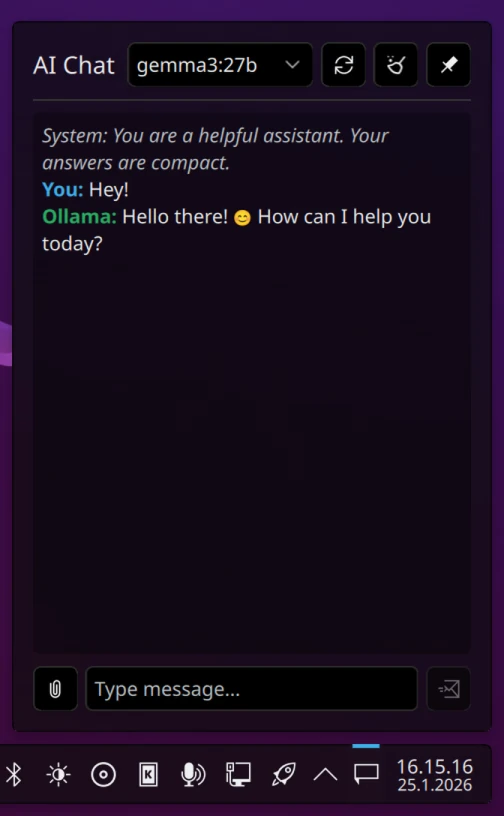
## Features
- Chat with local Unsloth Studio models
- Multi-turn conversations with full chat history
- Image attachments for vision-capable models (PNG, JPG, JPEG, WEBP)
- Configurable system prompts
- Static API token authentication
- Selectable default model
- Clean, native KDE Plasma UI using Kirigami
## Requirements
- KDE Plasma 6.0 or later
- [Unsloth Studio](https://github.com/unslothai/unsloth) running locally (see [Setup](#setup))
## Setup
Before using the widget, start Unsloth Studio:
```bash
pip install unsloth
unsloth studio -H 0.0.0.0 -p 8888
```
This will serve your models at `http://localhost:8888`.
## Installation
1. **Install the widget**:
```bash
git clone https://git.huitsinnevada.fi/NikkeDoy/Plasma-unsloth-Chat
cd Plasma-unsloth-Chat
kpackagetool6 -t Plasma/Applet -i .
```
This registers the widget in your Plasma system.
2. **Restart Plasma**:
```bash
plasmashell --replace &
```
> Restarting is recommended to fully activate the new widget.
> Alternatively, log out and log back in.
## Usage
After installation, add the widget to your panel:
1. Right‑click the panel → **Add Widgets…**.
2. Search for **Unsloth** and add it.
3. Open the widget settings (right‑click → Configure) and enter your Unsloth Studio URL and API token.
The widget will connect to your Unsloth Studio instance, list available models, and let you start chatting.
## Configuration
Right‑click the widget → **Configure** to set:
| Setting | Description |
|---------|-------------|
| **Unsloth Studio URL** | API endpoint (e.g., `http://localhost:8888`) |
| **API Token** | Authentication token for the API |
| **System Prompt** | Custom system prompt for every conversation |
| **Default Model** | Model to select on startup |
## License
This project is licensed under the GNU General Public License v3.0. See the `LICENSE` file for details.
## Project Website